Guides · Updated 30 October 2026
Crop RAW bird photos on a Mac
One RAW photo is easy to crop on a Mac in Apple Photos or any RAW editor; a few thousand from a trip is the hard part. BirdFrame crops a whole folder of CR2, CR3, NEF, ARW, ORF, RAF, RW2 or DNG files in one go: it finds the birds and saves a JPEG crop of each one, cut from the full-size original, and leaves your RAW files as they are.
Short answer: Apple Photos and most RAW editors crop one photo at a time, and batch tools paste the same box onto every photo, which misses a bird that moves. BirdFrame reads a folder of RAW files, subfolders included, finds the birds, including small, distant and half-hidden ones, and crops each one Tight, Balanced or Wide. Export Crops saves every crop as a JPEG in a new folder, and the RAW files never change. It's free for up to 50 photos per run.
On Windows? See how to open and crop RAW photos on Windows.
The problem: thousands of RAW frames
A morning at a wetland can leave you with hundreds of frames, and a week-long trip with thousands. In most of them the bird is a small shape, somewhere different in every frame. Cropping by hand means opening each RAW file, finding the bird, dragging a box around it and exporting, again and again. At 20 seconds a photo, 3,000 frames is more than 16 hours of cropping. BirdFrame does the whole folder in one go instead, so there's no cropping by hand.
How the usual Mac tools handle a batch
| Tool | What it does with a batch of photos |
|---|---|
| Apple Photos | Crops one photo at a time. Copy Edits doesn't include the crop (more on Photos). |
| Lightroom Classic | Sync or Auto Sync copies one crop to the selected photos (why that cuts off a moving bird). |
Automator, Shortcuts, sips | Crop every image to one fixed box, centred or at a set position. |
| BirdFrame | Finds the birds in each photo and crops around each one, for a whole folder in one go. |
A fixed or synced box works when the subject sits in the same place in every frame. Birds don't: one frame has the bird on a branch on the left, the next has it taking off on the right.
Crop a folder of RAW files with BirdFrame
- Choose the folder. BirdFrame reads Canon CR2 and CR3, Nikon NEF, Sony ARW, Fujifilm RAF, OM System and Olympus ORF, Panasonic RW2 and DNG, and JPEG, PNG and HEIC files in the same folder. Subfolders are included, and a RAW+JPEG pair counts as one photo.
- Pick a framing and a shape. Tight (the bird fills about half the frame), Balanced (about a third) or Wide (about a fifth); square, 4:3, 3:2 or 16:9. The preview shows the crops before anything is saved.
- Click Crop Photos. BirdFrame finds the birds in every photo, including small, distant and half-hidden ones. Open any result to check it.
- Click Export Crops and choose a folder. BirdFrame saves every crop as a JPEG in a new folder inside the one you chose, then offers to show it in Finder. A photo with two birds gives two crops. Tick For iNaturalist if you want tight crops with file names that start with the capture date.
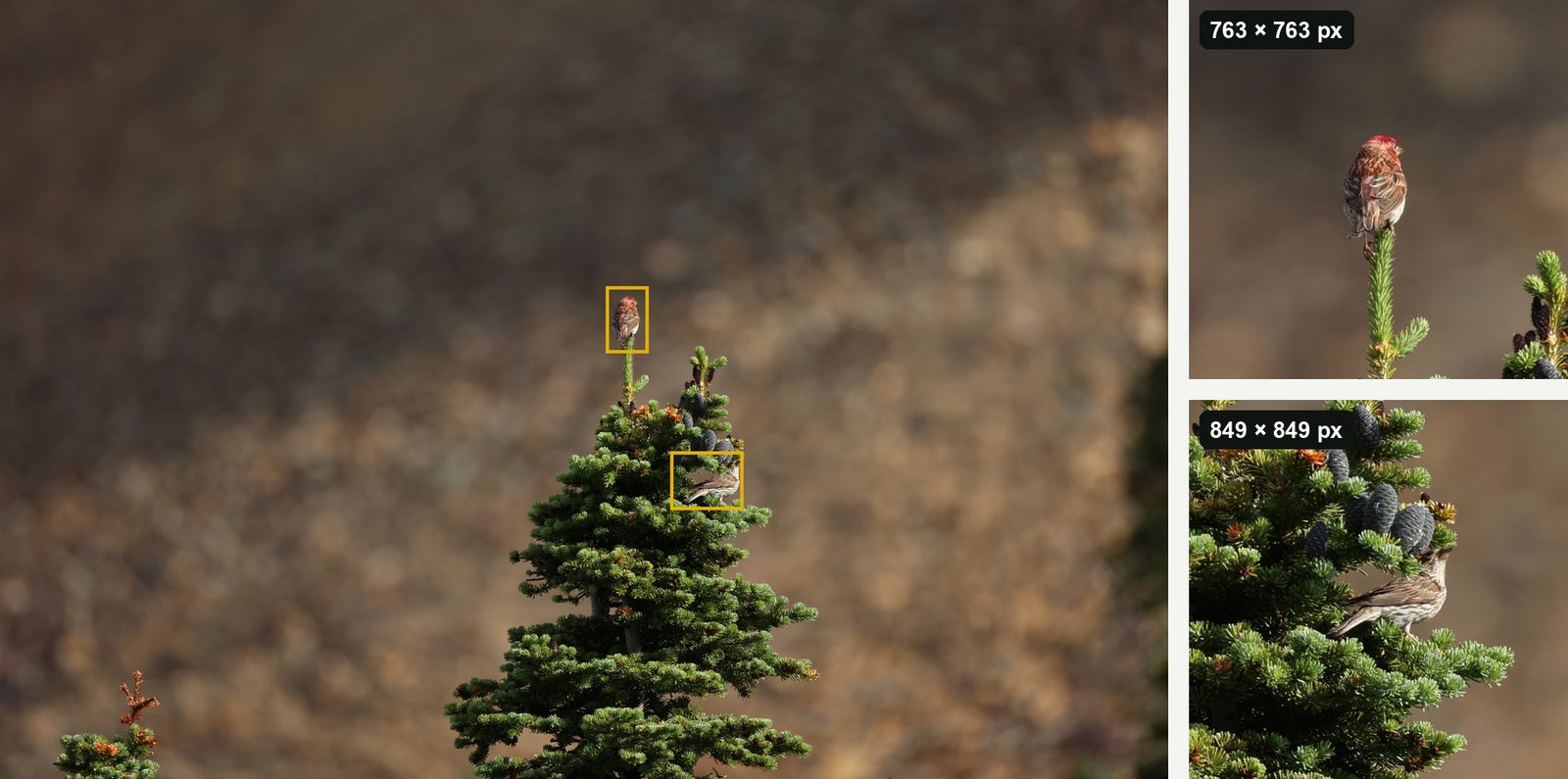
Full resolution, nothing generated
Each crop is cut from the full-size original. Nothing is downscaled, upscaled or filled in, so a crop holds all the detail the frame had around the bird. The crops are high-quality JPEGs that keep the photo's capture date, camera and lens details and, unless you turn it off to protect a nest site, its location. Your RAW files are never changed, and everything runs on your Mac, with nothing uploaded.
What to check in the crops
- They're JPEGs, not RAW files. A crop is a finished picture, ready to share, upload to eBird or iNaturalist, or print. It can't be developed again like a RAW file, so keep the RAW for heavy editing. BirdFrame doesn't edit RAW files.
- Your edits aren't in them. BirdFrame works from the files in the folder, not from adjustments you've made in Lightroom or another editor. If you want your edits in the crops, export the edited keepers as full-size JPEGs first, then crop that folder.
- The size is what the bird gave you. Crops are never enlarged, so a distant bird gives a small crop. Open one in Preview and choose Tools > Show Inspector to see its size in pixels, then compare it with what you need (how many pixels a print or a screen needs).
- Date, camera and location. The same Inspector shows whether the capture date, camera, lens and location came through. To leave location out of future exports, turn off Include location in exported crops in Settings → General → Exports.
- RAW+JPEG pairs. A pair is cropped from its JPEG, so set the camera's JPEG to its largest size; a small JPEG gives small crops.
- File names. Each crop takes its original's file name plus a bird number (for example
IMG_1234_bird_001.jpg), so it's easy to find the RAW file behind any crop. - Skipped files. Some RAW variants don't open on every Mac yet, such as Nikon High Efficiency RAW and Fujifilm compressed RAF. BirdFrame skips them and says so. Shoot RAW+JPEG, or convert them to DNG with Adobe DNG Converter.
What it costs
BirdFrame is free for up to 50 photos per run, as many runs as you like, and a RAW+JPEG pair counts as one photo. A one-time $29.99 unlocks bigger batches, so a whole trip crops in one go. There's no subscription, and it needs macOS 15 or later; Apple silicon Macs are fastest.
Questions
Can BirdFrame edit RAW files?
No. It reads them and saves a JPEG crop of each bird it finds. It doesn't change exposure, colour or anything else, and your RAW files stay exactly as they are. Do your RAW editing in your usual editor.
Which RAW formats does BirdFrame read?
Canon CR2 and CR3, Nikon NEF, Sony ARW, Fujifilm RAF, OM System and Olympus ORF, Panasonic RW2, and DNG, from a folder. Some variants don't open on every Mac yet, such as Nikon High Efficiency RAW and Fujifilm compressed RAF; BirdFrame skips them and says so.
What happens to RAW+JPEG pairs?
A RAW+JPEG pair counts as one photo, so each shot is cropped once, not twice. BirdFrame crops a pair from its JPEG, so set the camera's JPEG to its largest size.
Do the crops keep the date and location?
Yes. Each exported crop keeps its photo's capture date, camera and lens details and GPS location. To leave location out, for example to protect a nest site, turn off Include location in exported crops in Settings → General → Exports.
Crop every bird in one go, at full resolution. BirdFrame finds the birds in a whole album or folder and crops each one from the full-size original. Free for up to 50 photos per run.