Guides · Updated 1 November 2026
Bird photo culling software for Mac
Culling is the first job after a day with a long lens: going through hundreds or thousands of burst frames to keep the sharp ones. A handful of Mac apps now do it with the bird in mind.
We make BirdFrame, which is not a culling app: it crops the keepers afterwards. Facts below are from each maker's own pages and the Mac App Store, read on 27 October 2026. Prices change; check before you buy.
Short answer: for a free start, try SuperPicky or Project Kestrel. For a polished one-time purchase, BurstPick ($89) and RobinRAW ($29.99) are built around birds. If you already pay for Lightroom Classic, its Assisted Culling picks on subject and eye focus. Whichever you use, the keepers still need cropping, which you can do for the whole set in one go afterwards.
The tools at a glance
| App | Price | Made for birds? | What it does |
|---|---|---|---|
| SuperPicky | Free (Mac App Store) | Yes | Rates bird photos 1–3 stars from head sharpness and aesthetics, reads focus points from RAW, groups bursts; recent versions also suggest the species |
| Project Kestrel | Free, open source | Yes | Finds each bird, scores its sharpness, suggests the species and shows a close-up of the bird for review |
| BurstPick | $89 once | Partly: can judge birds' eyes | Groups bursts and ranks frames on focus, eyes, exposure, composition and noise; Mac, Windows and Linux |
| RobinRAW | $29.99 once | Yes | Thumbnails zoomed to the bird, one-key ratings written for Lightroom Classic, then per-photo edits |
| Lightroom Classic, Assisted Culling | Adobe subscription | General | Picks on subject focus, eye focus and open eyes, inside Lightroom |
| Excire Foto | One-time | General (recognises wildlife) | AI search, keywording and culling on sharpness and aesthetics |
| Photo Mechanic | From $14.99/month, or a $299 perpetual licence | General | Very fast ingest, viewing, rating and captioning; a newsroom favourite |
Sources: SuperPicky, Project Kestrel, BurstPick, RobinRAW, Adobe, Excire, Camera Bits.
How to choose
- You shoot long bursts of small birds: pick a tool that judges the bird's head or eye, not just overall sharpness. SuperPicky, BurstPick and Kestrel all look at the bird itself.
- You live in Lightroom Classic: Assisted Culling keeps everything in one place, and RobinRAW's ratings carry over into Lightroom on import.
- You don't want a subscription: SuperPicky and Kestrel are free; BurstPick, RobinRAW and Excire are one-time purchases.
- You want to try before paying: start with the free tools on one outing and see which picks you agree with. To see the idea without installing anything, drop one burst into our free Burst Picker: it runs in your browser and shows which frame has the sharpest bird.
After the cull: crop every keeper in one go
Culling turns 2,000 frames into 200 keepers. Each of those still has the bird somewhere in a big frame, and cropping 200 photos by hand takes an evening. None of the culling tools above frames each bird across a whole set for you.
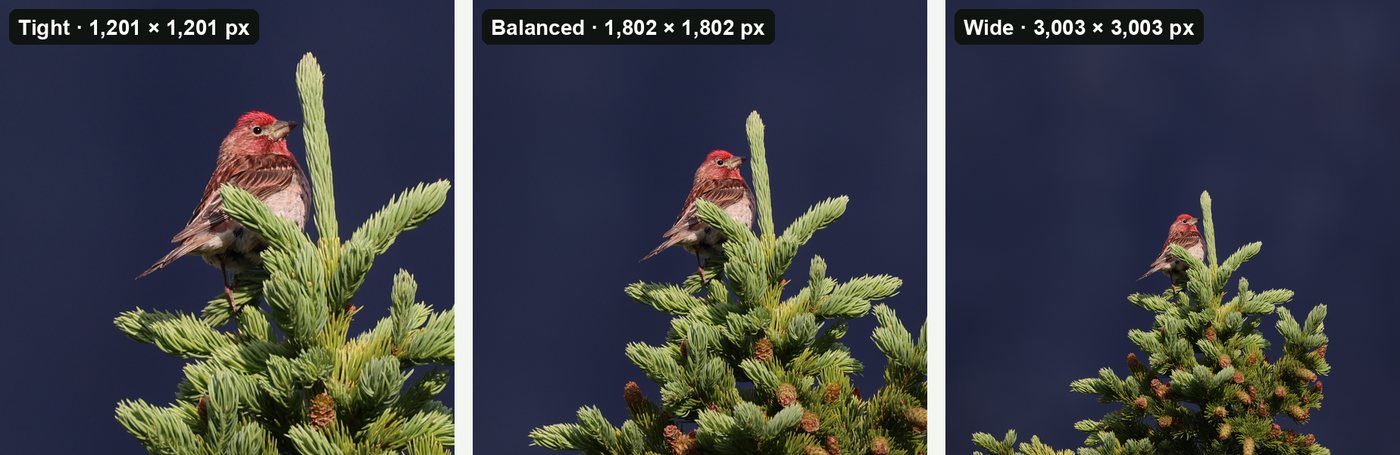
That's the job BirdFrame does. Point it at the folder of keepers (JPEG, HEIC or RAW) or at an Apple Photos album, pick Tight, Balanced or Wide, and it finds the bird in every photo and crops each one in one go, cut from the full-size original with nothing downscaled or generated. When you export, a photo with two birds gives two crops. It's free for up to 50 photos per run, and $29.99 once for bigger batches.
Questions
What is the best free bird photo culling software for Mac?
SuperPicky is free on the Mac App Store and rates bird photos on head sharpness and aesthetics. Project Kestrel is free and open source, finds each bird, scores sharpness and suggests the species.
Does culling software crop the photos too?
Mostly not. Culling tools rate, group and reject frames. RobinRAW has bird-framed crop presets in its per-photo editor. To crop every keeper in one go, use a cropping tool such as BirdFrame after the cull.
Is there a one-time-purchase culling app for Mac?
Yes. BurstPick ($89 once), RobinRAW ($29.99), Excire Foto (one-time) and Photo Mechanic (perpetual licence available) all avoid a subscription. SuperPicky and Project Kestrel are free.
Crop every bird in one go, at full resolution. BirdFrame finds the birds in a whole album or folder and crops each one from the full-size original. Free for up to 50 photos per run.