Guides · Updated 27 October 2026
Crop bird photos before you upload them to iNaturalist
Identifiers on iNaturalist look at thousands of photos. When the bird is a small shape in a big frame, they have to zoom in, and often there isn't enough detail left to zoom into. A crop before you upload fixes that.
Short answer: iNaturalist stores photos at up to 2,048 pixels on the long side. Upload an uncropped 24-megapixel photo and it's shrunk to about a third of its width, along with the bird. Crop the bird from the full-size original first and it keeps about three times the resolution, and more on higher-resolution cameras. Add one wider shot if the habitat matters.
Why cropping first keeps more detail
iNaturalist keeps every photo at no more than 2,048 × 2,048 pixels and resizes larger uploads to fit (it's set in iNaturalist's source code). We checked: of nearly 2,000 public-domain photos downloaded at iNaturalist's largest ("original") size, none was wider or taller than 2,048 pixels, and about 1,700 were exactly 2,048. So whatever you upload, that's the most iNaturalist keeps.
Here's what that means for a typical distant bird in a 24-megapixel photo (6,000 × 4,000 pixels), where the bird is 300 pixels long:
| What you upload | What iNaturalist keeps | The bird's length |
|---|---|---|
| The whole photo, 6,000 × 4,000 | 2,048 × 1,365 | about 100 px |
| A Balanced crop, 900 × 900 | 900 × 900 (no resize) | 300 px |
| A Tight crop, 600 × 600 | 600 × 600 (no resize) | 300 px, filling half the frame |
Same photo, three times the detail on the bird, just from cropping before the upload. It only works if you crop the full-size original. Cropping a downsized copy, or iNaturalist's own copy, can't bring the detail back.
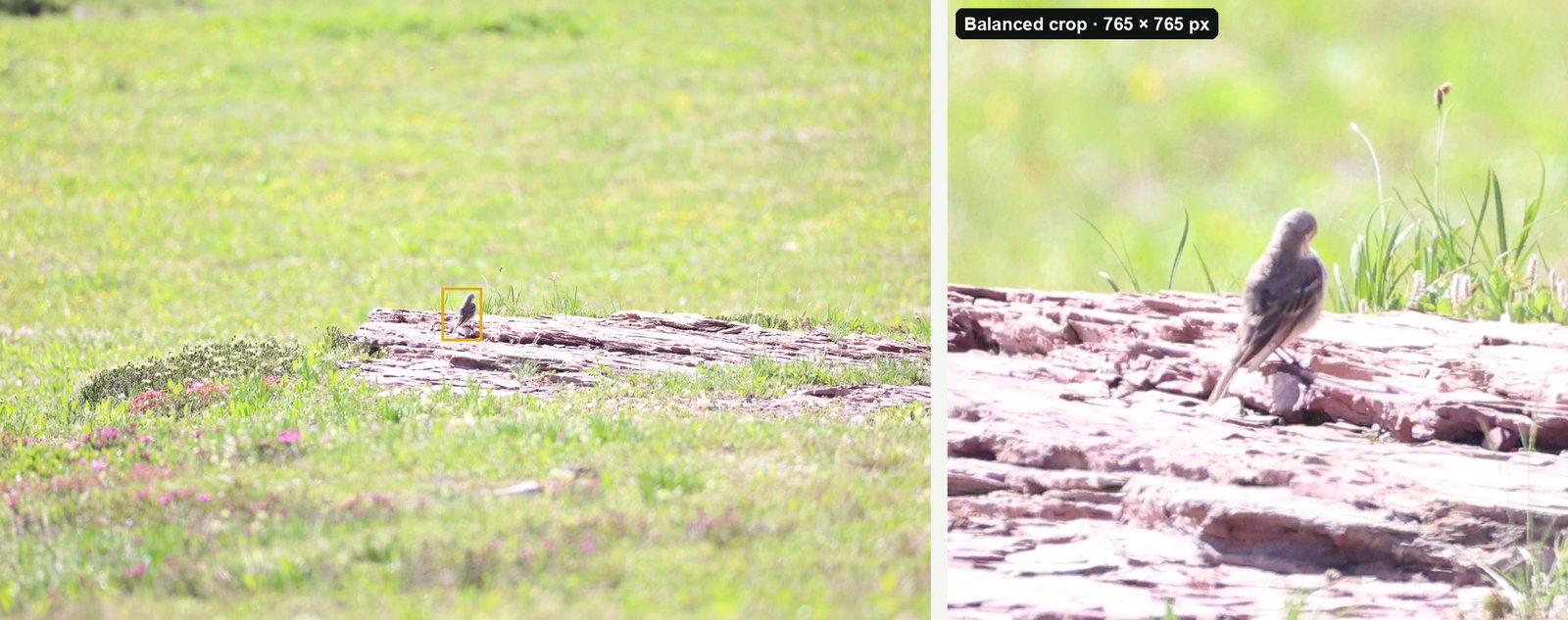
A real example. The photo below is a 20-megapixel original (5,472 × 3,648) with a small bird 255 pixels tall. Uploaded whole, iNaturalist would keep it at 2,048 × 1,365, and the bird would be 95 pixels tall. Cropped first (Balanced, 765 × 765), it's small enough that iNaturalist keeps it as it is, and the bird stays 255 pixels tall: about 2.7 times the detail.
What identifiers ask for
iNaturalist's own blog ("Smartphone Photography for iNaturalist", August 2026) puts it simply: the automatic species suggestions look at one photo, the first one by default, so make the first photo a clear close-up of the organism and add context shots after it. The long-running forum thread "A plea to crop your photos!" makes the same request on behalf of human identifiers. Cropping is never required, but for small birds it makes an observation much easier to identify.
- First photo: a tight crop of the bird, sharp and well lit.
- Extra photos: other angles, the underwing, a flight shot, or a wider frame showing habitat. iNaturalist's uploader takes up to 20 photos per observation (a limit iNaturalist explained on its forum in 2020).
- Files: JPG, PNG or GIF, each under 20 MB.
- Edit honestly. iNaturalist accepts cropping, but not AI upscaling, generative fill or background replacement (iNaturalist help). A crop from the original keeps only pixels your camera recorded.
- One bird per observation. If two species are in one frame, crop each and make two observations.
Crop a whole trip for iNaturalist in one go
BirdFrame is a Mac app with an export made for this:
- Choose a folder (or an Apple Photos album) with your photos. JPEG, HEIC and RAW files from Canon, Nikon, Sony, Fujifilm, OM System, Panasonic and DNG work (a few newer RAW variants, such as Nikon High Efficiency RAW, are skipped).
- Run it. BirdFrame finds the bird in every photo, including small, distant and half-hidden ones. A photo with two birds gives two crops.
- Export Crops and tick For iNaturalist. You get a tight crop of every bird, cut from the full-size original. File names start with the capture date (for example
2026-05-14_IMG_1234_bird_001.jpg), and each file keeps its date, camera details and location. - Drag the files into iNaturalist's uploader, which reads the date and place from each photo.
BirdFrame finds birds only, so it won't help with insects or plants. It's free for up to 50 photos per run, and a one-time $29.99 unlocks bigger batches.
Questions
Should I crop photos before uploading to iNaturalist?
Yes, for small or distant subjects. iNaturalist stores photos at up to 2,048 pixels on the long side, so cropping first from the full-size original keeps far more detail of the bird. Add one wider photo too if the habitat helps the identification.
What size are iNaturalist photos?
Up to 2,048 × 2,048 pixels; larger uploads are resized to fit. In nearly 2,000 photos we downloaded at iNaturalist's "original" size, none was larger than 2,048 pixels.
How many photos can an iNaturalist observation have?
iNaturalist's uploader takes up to 20 photos per observation, a limit iNaturalist explained on its forum in 2020.
Does BirdFrame work for insects or plants?
No. BirdFrame finds birds. For other subjects, crop by hand or with a general photo editor.
Crop every bird in one go, at full resolution. BirdFrame finds the birds in a whole album or folder and crops each one from the full-size original. Free for up to 50 photos per run.