Guides · Updated 28 October 2026
Christmas Bird Count photos: how to document a rare bird
The 127th Christmas Bird Count runs from December 14, 2026 to January 5, 2027. If your party finds something unusual, a photo is often the best evidence you can give the editor who reviews it. Here's what a rare bird report needs, how to get a usable shot, and how to crop it and hand it over.
Short answer: set your camera's clock and ask your compiler which species they want documented. Take several frames that show the field marks, and note what the photos can't show. Crop from the full-size original so the bird is large with space around it, and don't add, remove or enhance anything. Give your notes, the crop and the original to your party leader or compiler.
Which birds need a report
Audubon's compiler manual (November 2025 edition, pages 10 and 18) sets out three cases:
- Neotropical migrants with few accepted winter records in North America. Reports of these "MUST be accompanied by impeccable substantiating details, preferably including sketches and/or photographs, or they will be deleted from counts."
- Anything out of range, out of season or hard to identify. "The best rule is that if it's a 'good bird' or not a winter regular, it should include details. Lack of a report could result in the species being omitted or tagged with the comment ND (no details)!"
- Rare calls picked up with Merlin. If Merlin helps identify the call of a rare or hard-to-identify species, "secondary identification by sight or photography should be obtained to permit inclusion of that species."
Your regional editor decides which species need a report and whether a record is accepted, and editors often tell compilers in advance which species they want documented. Ask your compiler before count day.
How rare birds are reported this season
For the 2026–27 count, Audubon has a new online data form. When a party leader or compiler enters a species that's rare for the circle (the form judges this from how often it has been seen there, using eBird data), it asks for a description of how the bird was identified, including diagnostic markings and sounds, and for any photos. Those details go straight to the compiler and the regional editor, with "no separate form required" (Audubon's CBC Resource Hub, updated October 5, 2026).
Some unusual birds won't be flagged. For those, the compiler or regional editor may ask you for identification details, diagnostic features and any photos, and Audubon still offers a printable Rare Bird Form for when it's needed (Documenting Rare Species, updated October 26, 2026). Either way, the editor judges the record from what you hand over, so the photo should be easy to read and the notes written the same day.
On count day: get a usable shot
- Set your camera's clock first. Check the date, time and time zone before you leave. The timestamp becomes part of your record.
- Turn on location if your camera or phone can record it.
- Shoot several frames, from different angles if you can, aiming for the features that separate the bird from its look-alikes. A plain shot that shows the right features beats a lovely one that doesn't.
- Write down what the photo can't show: calls, behavior, size, distance, light, how long you watched it and who else saw it. Audubon's Rare Bird Form also asks which similar species you considered and how you ruled them out.
- Don't rely on a photo of the camera's screen. eBird's photo guidelines warn that back-of-camera images "may not be high enough resolution to show critical details" and "lack important metadata such as date and time". It's fine for a quick alert to your group; send the real file later.
Crop it for documentation
A bird that's a speck in a 20-megapixel frame is hard to judge on a laptop screen. Crop so the bird is large, but don't crop down to the feathers: the setting, and the bird's size next to a log or branch, can help the editor too. eBird's photo guidelines put it well: "Crop photos so that the bird is large and visible in the frame. However, make sure to leave plenty of 'canvas' around the edge of the bird."
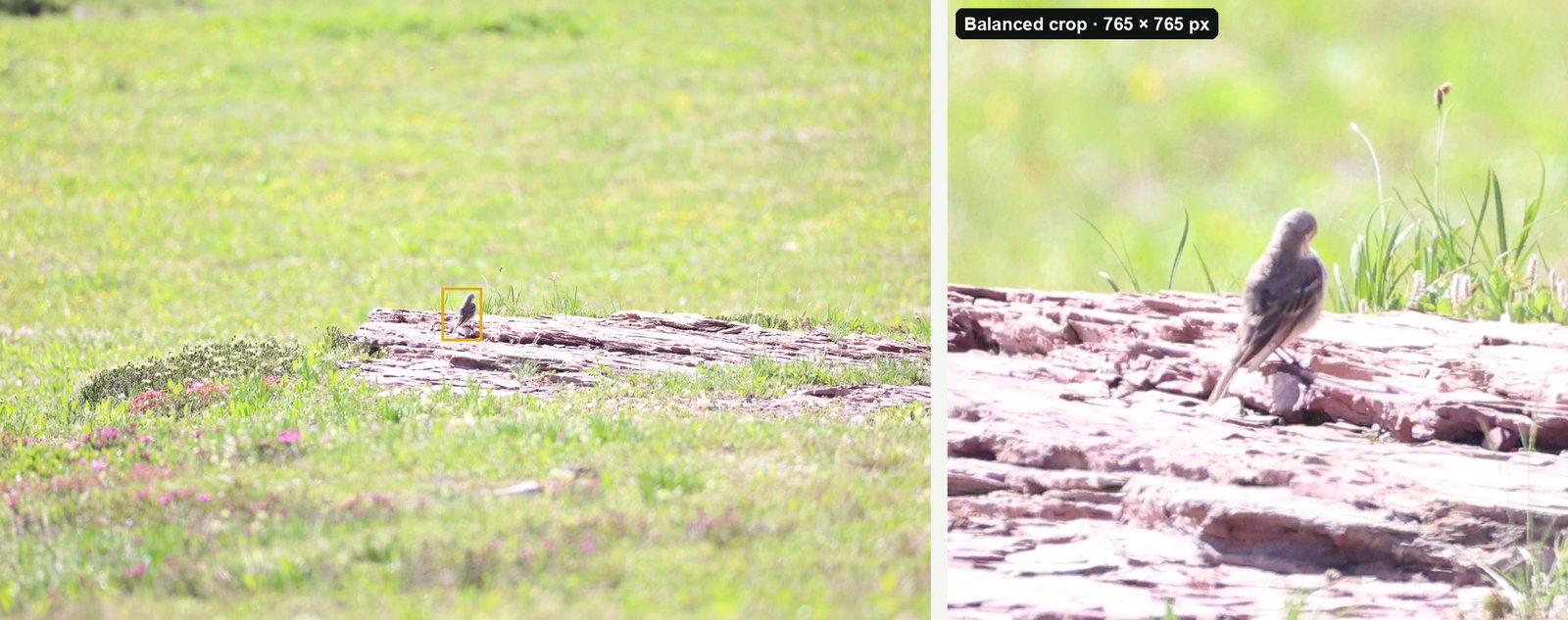
- Balanced or Wide. Balanced (the bird fills about a third of the frame) suits most documentation shots. Wide (about a fifth) keeps more habitat for scale. If you go tighter, check the tail, bill and feet are still in the frame.
- Crop, don't change the bird. Skip heavy sharpening, extra saturation and AI "enhance" tools, and never remove a branch or add anything. As eBird's editing policy (August 2026) puts it, "A photo that is imperfect but unaltered is always preferable to one that has been artificially clarified or completed."
- Crop the original, not a copy. A crop of the full-size file keeps every pixel the camera recorded. A crop of a phone-sized export or a screenshot can't be enlarged back later.
- Keep the original. The crop shows the bird; the original shows everything else, with its date, time and location intact.
Keep the date, time and place
The date, time and place are what turn a photo into a record. Most cameras and phones write them into the file, but some editing and export steps strip them out, and screenshots never have them. eBird's editing policy asks for "workflows that maintain accurate EXIF metadata on your edited or exported photos". On a Mac, open the crop in Preview and choose Tools > Show Inspector to check the date and location are still there.
Compilers get photos from lots of people, so a clear file name helps too. One simple pattern is 2026-12-19_Springfield-CBC_Eurasian-Wigeon_J-Smith_01.jpg. Keep the camera's file number in the name as well, so anyone can match a crop to its original.
What to hand over
- the species, how many, and the name of your count
- the date, time and exact place
- who saw it, and your name and contact details
- what you saw and heard, in your own words, written the same day
- the cropped photo and the original, as JPEGs unless they ask for RAW files
Documentation goes to your regional editor, not to Audubon, and the manual is clear that "The decision about accepting unusual species is up to your regional editor."
There's also a one-page PDF of this guide to print for count day. Clubs are welcome to share it and reprint it in their newsletters.
Cropping a whole count day in one go
You don't need special software to crop one documentation shot; any photo editor will do it. But count day can leave you with hundreds of frames, and cropping each one by hand is the slow part. BirdFrame is a Mac app that finds the birds in a whole folder or Apple Photos album, including small, distant and half-hidden ones, and crops each one in one go.
Each crop is cut from the full-size original, with no downscaling and nothing generated, so every pixel in it is one your camera recorded. Exported crops keep the photo's capture date, camera details and location, and take the original's file name plus a bird number (for example IMG_1234_bird_001.jpg), so each crop is easy to match to its original. Folder exports never change the originals, and crops made in Apple Photos are reversible edits. It reads JPEG, HEIC and RAW files.
BirdFrame doesn't identify the bird; that part is still yours. For a handful of documentation shots, the free version (up to 50 photos per run) is all you need. A one-time $29.99 unlocks bigger batches, and it needs macOS 15 or later.
Questions
When is the 2026–27 Christmas Bird Count?
The 127th Christmas Bird Count runs from December 14, 2026 to January 5, 2027. Each count circle holds its count on one day in that window. Audubon keeps the same dates every year.
Do I need a photo to report a rare bird on the Christmas Bird Count?
Not always, but it's the strongest evidence you can give. Audubon's compiler manual says reports of Neotropical migrants with few accepted winter records must come with impeccable details, preferably including sketches or photos, or they'll be deleted. Other unusual birds need written details; without them a species can be left off or tagged ND (no details).
How do I submit rare bird photos for the CBC?
For the 2026–27 count, Audubon's online data form flags species that are rare for your circle and asks for a description and any photos. Party leaders and compilers enter the data, so give yours your notes, a cropped photo and the original. Your regional editor decides whether the record is accepted.
Do I need BirdFrame for the Christmas Bird Count?
No. Any photo editor can crop one documentation shot. BirdFrame helps when count day leaves you with hundreds of frames: it crops every bird in one go, from the full-size original. It doesn't identify species, and it's free for up to 50 photos per run.
BirdFrame isn't affiliated with the National Audubon Society or the Cornell Lab of Ornithology.
Crop every bird in one go, at full resolution. BirdFrame finds the birds in a whole album or folder and crops each one from the full-size original. Free for up to 50 photos per run.